Showing posts with label Cricut. Show all posts

Thursday, May 19, 2016

Poet-Tree

The month of April has so many observances that it was hard to pick just one to focus on in the library.  This year, I decided to combine Arbor Day with poetry.  Most grade levels focused on a style of poetry.  Kindergarten made Acrostic poems about trees. First grade did Haiku, third grade did Cinquain, and fourth grade did Diamante poems about trees.  It helped that they were familiar with the different styles of poetry.  Fifth grade had fun creating Book Spine Poetry.


ReadWriteThink is a lifesaver
Since third and fourth graders shared their Cinquain and Diamante poems with me on Google Drive, I was able to make comments. This gave helpful feedback to the students, which they liked.  It nudged them to ask questions about how to improve their poems.


Pre-K and Kindergarten helped list ways that trees are helpful after reading Shel Silverstein’s The Giving Tree.

Friday, February 20, 2015

Arctic Blast


The kindergarteners, first and second graders have been busy doing research about polar region animals.  The kindergarteners learned about four different kinds of penguins.  First graders learned about polar bears.  Second graders learned about a variety of arctic animals. 


First, I shared the signed copy of the book, One Cool Friend by Toni Buzzeo with the kindergarteners. While a small group of students learned about a penguin, the rest of the class was able to practice sight words and math skills with penguin themed activities.  Life-sized penguins took over the media center so students were able to get a better idea of the actual size of these “proper” birds.  They were able to use nonstandard measurement to compare the height of the five types of penguins displayed. Students loved doing yoga with Pedro the Penguin.  After groups of 4-5 students learned about one penguin, using PebbleGo,  they typed what they learned in an Animoto.  Some students displayed what they learned beside the life-sized penguin. Students also labeled a penguin. Thanks to Kindergarten Crayons.


Letter Match/Alphabetical Order -Cricut Create a Critter
Polar bears were the topic for the first graders.  First we talked about the Super 3 research process.  For the planning step, they used an ARE, CAN, HAVE graphic organizer to take notes.  Students used the links on the K-2 Symbaloo that I created for them, PebbleGo, and information that we learned from the book Knut: How OneLittle Polar Bear Captivated the World by by Craig Hatkoff and others.  Some students were able to dig a little deeper using QR codes to find the answers to questions about polar bears. Look for the Polar Bear QR Code Webquest at Emily Gibbons Teachers Pay Teachers store.   While students used their notes to do a report, one student at a time experimented with blubber.  One sentence from the completed reports was chosen for the student to type into an Animoto video.  Some students will present their information in a ChatterPix.  The students viewed the presentations and we discussed what we learned and how we felt about each presentation.  The review concluded our Super 3 process.  Students were excited to tell their teachers what they learned.
Polar Bears
Polar Bear at NC Zoo

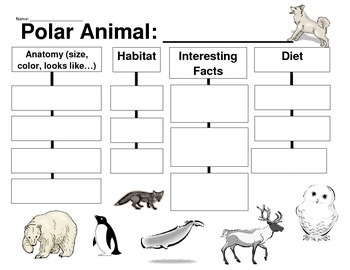
The second graders learned about some interesting animals in arctic regions.  Using library books, magazines, links from our K-2 Symbaloo.  Students found as much information as possible to share with the class.  We did the same experiment as the first graders.  It was “cool” to see how blubber keeps the arctic animals warm.  One second grade class used the ARE, CAN, HAVE graphic organizer, while one class used a graphic organizer by Tiffany Reed, that required them to explain the anatomy (size, color, and appearance), habitat, diet, and interesting facts.  Some students used Animoto or Chatter Pix to present their information.  Others will present their information with a lapbook.   
Polar Animal Graphic Organizer


Blubber Experiment

I might use the life-sized penguins and lapbooks in combination with the Animoto videos and ChatterPix via QR codes for Digital Learning Day.  What are you doing for Digital Learning Day?

Tuesday, January 13, 2015

Batman Returns...His Books

After learning that Bat Girl was a librarian, I decided to change the name of my "dwelling" to the Bat Cave.  For Halloween, I dressed up as Bat Girl.  Pinterest has inspired the bulletin board pictured below.  It has caught the eye of students and teachers.

Data! Data! Data! Data! Batman!

I quickly put up the data because I didn't want it to look unfinished.  I plan to display an updated infographic each month. There are some things that I need to figure out first.

Saturday, February 1, 2014

Countdown to Disney

Since my grand-daughter found out that we are going to Disney to celebrate our birthdays, she has been telling people that we are going tomorrow.  My grand-daughter will be five years old in April.  I will be five times ten. ;)

On Pinterest, I keep seeing Disney countdown ideas.  There are some really cool ideas.  I like to put my own spin on the pins.
Really Cool
http://media-cache-ec0.pinimg.com/originals/cb/b7/70/cbb7705c48f19e7e51f9addd5b4d046f.jpg
This is a Favorite
The teacher in me wanted to make this a "teachable moment" for my grand-daughter. The countdown chain is totally awesome, but I wanted my four year old to be able to see the numbers and make a connection.  While I cut out the Mickey Mouse silhouette on my Cricut, she put the numbers in the chart.  She said, "It's a lot of numbers."  I told her, "That's because there's a lot of days before we go."
She takes this stuff seriously
The numbers were in order when I gave them to her, but occasionally she would put the numbers in the wrong place.  I pointed out the pattern to her.  Whenever she would mess up, she would stop and look.  She knew something was wrong, but she didn't know how to fix it.  I would remind her about the  pattern.  It was funny when she got to 66.  She put it in upside down. I told her to look at the numbers around it, and she fixed it.
She found the perfect spot for the chart.
Now she knows that when all the numbers are covered, we will be on our way to Disney.  When she comes to my house, she can see how many days are left.  She is very familiar with our My Disney Experience page, so she will probably know if I haven't updated the chart.  I think I'll put stickers on the numbers to set goals for when to confirm the details of our trip, confirm car rental, pack, and other trip details that come to mind.

My next project will be to make a Busy Bag for her.  Later I will make an autograph book. 

Friday, September 13, 2013

I See You Checking Me Out

The first few weeks of school have been a little hectic.  Not only did I start another semester of grad school, I had to do lesson plans, set up AR, get student numbers ready, distribute Chromebooks and Nooks, set the timers for Chromebooks and Nooks, and get the library ready for students and visitors.  I'm sure that I left out something. 
The PAWSibilities are Endless

I actually enjoyed getting the library ready.  Our school hosted a PBIS meeting the second week of school.  One of the first bulletin boards that I finished was my PBIS board. The Bulldog was cut with the School Spirit Cricut cartridge.  The letters and scalloped border were cut with the Schoolbook Plantin cartridge.  You can't see it in this picture, but I added texture to the wide border with an embossing folder on the Cuttlebug.  The paws were cut with our Ellison Cutter.  It is time to replace the cutter.  The pads are worn, and we can't find new pads.

Putting speech bubbles on some of the books proved to be a "selling" feature.  I am trying to get the students to see that we have other books besides Diary of a Wimpy Kid, Captain Underpants, Clifford, and Dr. Seuss. You know that feeling when a student leaves empty handed because there are no more copies of the series he or she has become "comfortable" with.  I am thrilled that the students are excited about reading the latest antics of "Pigeon", "Pete", Greg Heffley, and Skippyjon Jones, but I really want them to step outside their comfort zone.
I See You Checking Me Out
This is the Place for Characters
I know!  Why did I feature these characters on a bulletin board if I want the students to check out other books?  For one, I had no idea that the students missed their old friends so much.  I thought, okay, they are older, so their tastes have changed.  NOT!  Third graders are checking out the same "Pigeon" books that they checked out in second grade.  I even directed them to the new Mo Willems books that were added this summer. Another reason is that it will be easier to make connections when we talk about story elements.  I plan to do another bulletin board nearby, titled, Reading Takes Us Places or Oh! The Places You'll Go, for setting.  The main reason, I love these characters.  When I saw Primary Possibilities' door decor on Pinterest, I had to use the idea.
Word Clouds replaced the Dewey Decimal Posters in the nonfiction section.  I had fun searching for props for this section of the media center.  Some came from my past life as a first grade teacher.  Others were found while I was cleaning and organizing the media center, this summer.  A few of the dinosaurs just returned to their former residency.  I was surprised when I told a student that the book she was looking for, was on the shelf below the microscope, and she said, "What is a microscope?"  I am so glad that we are setting up a science lab in an empty classroom.

I am having a difficult time with the fiction section.  I will add genre posters. I plan to get the students to help make the genre posters.  Other than the speech bubbles on the books, I can't find my Mojo for this area.  Maybe a book club or classroom book/author study group could help me with the fiction area.

The art teacher and I are collaborating for International Dot Day.  I will post about our activities soon. Here is one the most fun activities that we did during library lessons.  You can download the app and coloring sheet at colAR app.  It's free.  It works on iPads, iPhones, and Droids.  I could not get it to work on the iPod.


Friday, August 30, 2013

The 70's Called...

The library was "overdue" for a makeover.  The orange counter tops and light blue cabinets had to go.  The walls needed a fresh look too.  Even the posters were outdated.  You may remember an earlier post, My Dream Library.  It's finally starting to become a reality (at least close to reality).
The 70's Want Their Counters Back

A Quick Fix


An answer to my prayer came when a friend contacted me, and asked if my school had any projects for her Eagle Scout son. With the help of his mom, dad, girlfriend, and two other scouts, we brought the library into the 21st Century.


Already Looking Better

Before

After

I'm still putting things back together.  With a very small budget, I'm recycling, using the Cricut, and using Dollar Tree finds to decorate. 


I really wanted to cut the old encyclopedias into letters to spell out fiction and nonfiction. For now the encyclopedias are covered with adhesive shelf liner from Dollar Tree and duct tape.  The crate seats were covered with paw print fabric which I had cut out to make my sister's dog a dog bed (The dog left with the ex.).  The crate seats will hold stuffed animals and puppets for students to read to. :)

Instead of painting the teacher work spaces, I used the "granite" adhesive shelf liner and duct tape to make the 70's disappear.
New Granite Counters
We were not able to install new laminate counters, per maintenance department.  We sanded, primed, and painted/covered the counters instead.  The doors will remain closed to the kitchenettes.  They still have orange counters.

More pictures will be added soon.

Saturday, January 5, 2013

Our Big Words

In order to make sure that I teach about Martin Luther King, I must start early.  I have read Martin's Big Words, in the past, but I have never done an activity with it.  This year I decided that after reading Martin's Big Words students in grades 2-5 would work in groups of 2-3 to create a Wordle.

4th Grade's Word Cloud Layout
My goal was to have students think about the words and teachings of Martin Luther King and create a Wordle to share with others. We ran into a problem when we had to install a program in order to print their creations.  After experiencing this with the first class, I decided that we could use the Cricut to cut out the letters and words.  The 4th Grade students thought it was the most awesome machine ever.  Before they realized just what the machine did, they were concerned that their handwriting would affect the "Word Cloud".  Students either watched the video, Martin's Big Words, played Just or Unjust by Sally at Elementary Matters, or read other books about Martin Luther King while I helped one student at a time cut out their word.  It was interesting to see how each grade level Word Cloud compared to other grade levels.  Now that there are a few "Word Clouds" displayed in the school, next week's classes will have to come up with some new words. That should be FUN!
Our Big Words: A Tribute to Dr. Martin Luther King Jr.
Creating the Word Clouds with the Cricut took more time than we had for each class, so this week's 5th grade class helped me create a Wordle for the class.  Next week, I will plan to do the "Word Cloud" for two days with a 3rd grade class and 5th grade class.